Factory
Runners and Claude
Factory threads run on SpudSuite runners that you install, using the Claude Code command-line tool on that machine. Each thread stays on the runner that first ran it, and every turn picks up the same Claude Code session.
Set up a runner for Factory
- Install a runner and pair it with your workspace.
- Install Claude Code on the same machine, so the
claudecommand works. - Sign Claude Code in, in one of two ways (below).
- Check with
spud factory status, which says whether Claude Code is installed and signed in. The Factory page shows the same for each runner.
To let Factory work on files on your own computer, in folders you choose and inside a sandbox, turn on personal mode.
See your runners in Factory
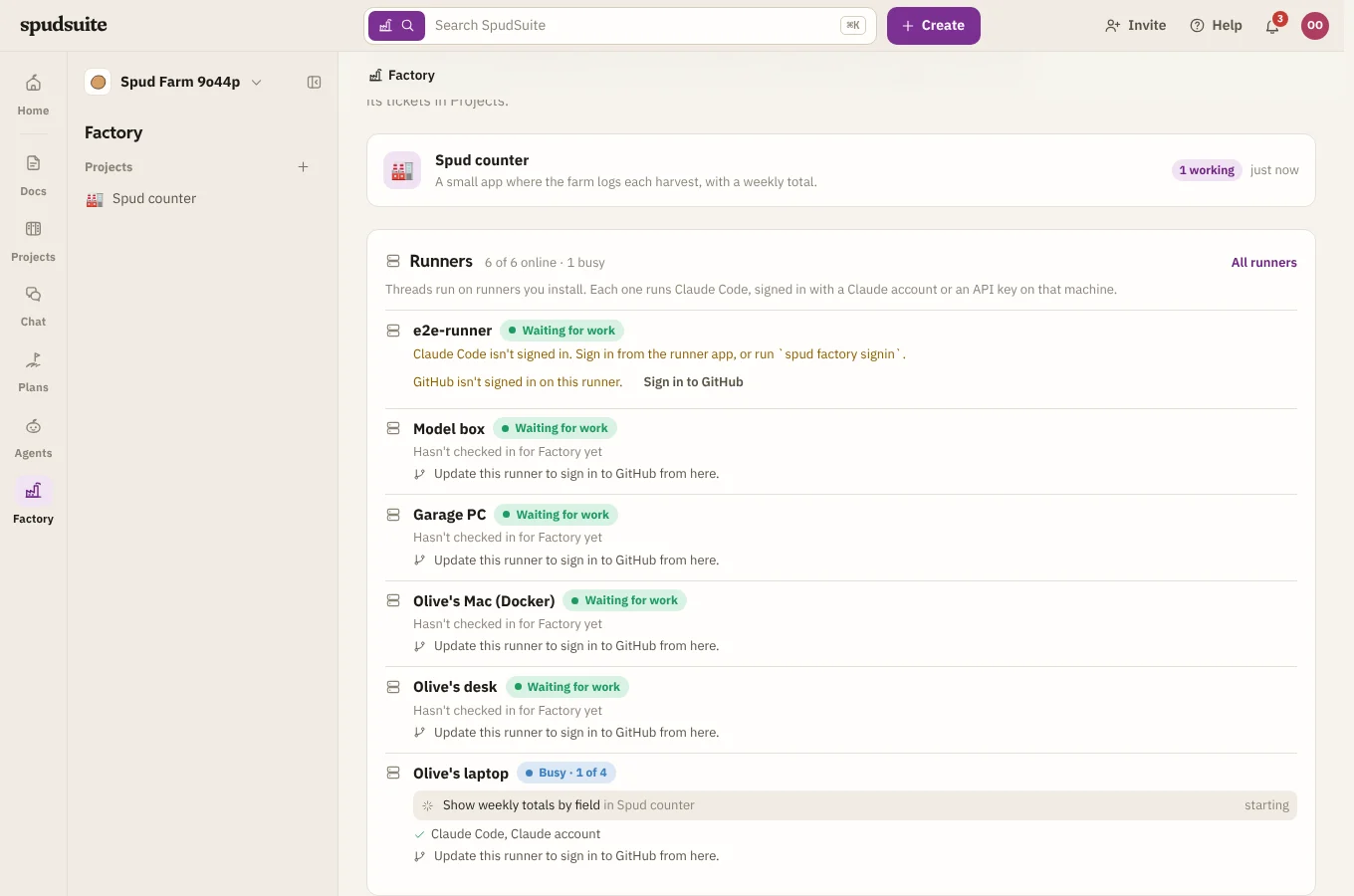
Factory's home lists every runner under Runners, near the top:
- Whether it's Offline, Waiting for work, or Busy with how many jobs out of what it can take at once. Full means it's taking all it can, so new turns wait for it.
- The threads it's working on now, with their project and how long each has been going. Click one to open the thread.
- Whether Claude Code and GitHub are signed in on it.
Click a runner's name to open its page under Agents, with its live activity, capacity and machine stats. All runners opens the full list.
A project's Overview shows the same for the runners its threads can run on, with only that project's work.
Signing in to Claude
With your Claude account. On the runner's page in SpudSuite, click Sign in with Claude and follow the steps (see Claude on a runner). Or open the runner app's settings and choose your Claude account, or run:
spud factory use account
spud factory signin
This opens Claude Code's own sign-in on Anthropic's page. The runner never sees, stores or sends your sign-in: it only asks Claude Code whether it's ready. Using your own subscription this way is for your own work; it's not for running Factory on behalf of other people.
With an API key. Put an ANTHROPIC_API_KEY in the runner's secrets (in the runner app, or see Secrets), then:
spud factory use api-key
Some SpudSuite sites only take turns from runners using an API key. Factory says so when you start a project if that's the case.
Running commands
By default, threads read and edit files in their folders, and run git, the GitHub CLI and a headless browser for screenshots. Claude Code refuses other commands, and the project chat asks whether to allow them. Tick Let threads run any command without asking to let them carry on by themselves. Only do this on a machine where that's safe, such as a dedicated server or a container.
Threads can read each other's folders on the runner, to see what the others have done, but each changes only its own.
Where the work happens
- The orchestrator works in a
mainfolder: a clone of your main repository, or a git repository that stays on the runner (see Without a repository). Other repositories in the project are cloned beside it (see Several repositories). - Private GitHub repositories, pushes and pull requests use the runner's GitHub CLI, or a personal access token saved on the runner. To give a group of runners one token, use a runner profile. Sign it in from the project's settings.
- Threads use the runner's own git settings, not yours, unless you choose otherwise.
- Each thread gets its own git worktree on a branch named
factory/<thread>, so threads don't trip over each other. When two threads fetch or push at the same moment, one waits for the other instead of failing, and two runners on one computer never set up the same project at once. - If a thread's folder is deleted by hand, the next turn puts its worktree back on the same branch.
- If a runner goes away mid-turn, the turn goes back in the queue and runs again when the runner is back.
When nothing picks the work up
If a thread or the orchestrator is waiting and no runner takes the work, Factory says why where the work would show, with a link to fix it:
- No runner is connected. Install one and pair it with your workspace.
- The project's runner was removed. Choose another in the project's settings.
- The runner is offline. Start it on its computer.
- The runner hasn't asked for Factory work. It's on an old version, or it's stuck. Update it from its page, or restart it.
- Claude Code isn't signed in. Sign in from the runner's page.
- The site doesn't take Claude accounts. Switch the runner to an API key.